
Graphium Surveys is a platform for building, sending, and analyzing surveys. This article gives you a quick tour of the main areas of the app.
Main navigation
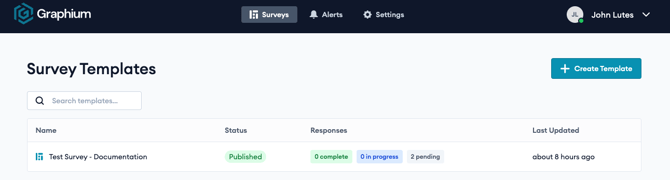
The top navigation bar has three main sections:
- Surveys: Create and manage survey templates, build questions, send surveys, and review responses.
- Alerts: A workspace-wide view of alerts triggered by survey responses.
- Settings: Workspace configuration, including Users, Lists, Logo, and API Keys.
Your account menu is in the top-right corner (your name). Open it to sign out.
Key concepts- Survey Template: The reusable definition of a survey — its properties, questions, settings, reminders, and alerts. Build it once, then send it to recipients.
- Property: A custom field attached to a survey to personalize or track responses (for example, a Patient ID).
- Question: An item a respondent answers. Several question types are available.
- Response: A single recipient’s instance of a survey, with their answers and score.
- List: A reusable set of values (with their own properties) that can power list-based answer options.
Key functionalities:
Publishing and Sending a Survey